
Information for Chairs, Moderators, and Speakers
1. Information for Chairs and Moderators
Please take your seat at the designated chairperson's seat 15 minutes before the start of your assigned session.
You will be responsible for conducting your session. Please ensure that the session proceeds according to the scheduled timetable.
2. Information for Speakers
[Special Program]
Please follow the moderator's instructions regarding the presentation time and session proceedings.
[General Presentations (Mini-Symposium)]
Each presentation will consist of 7 minutes for the presentation and 3 minutes for discussion.
[For All Oral Presentations]
- All oral presentations will be given using a computer presentation.
- Please bring your presentation data on a USB flash drive or your own computer to the PC Desk at least one hour before your scheduled presentation time. Please complete the registration and technical check of your presentation data.
- The PC Desk will be located in Room H on the 1st floor of the Kyoto International Conference Center.
- PC Desk Hours
Friday, October 16: 8:00–17:00
Saturday, October 17: 7:30–18:00
Sunday, October 18: 7:30–15:00
<For Presenters Bringing a USB Flash Drive>
- 1)
- The following application will be available at the PC Desk:
Microsoft PowerPoint for Microsoft 365 (Windows version)
If you prepare your presentation using a Mac, formatting issues such as misaligned text may occur. Please bring your own computer as a backup. - 2)
- If your presentation includes video or audio, please inform the PC Desk operator. Please also bring your own computer as a backup.
- 3)
- If you bring video files with your presentation data, the MP4 format is recommended.
- 4)
- A 16:9 slide aspect ratio is recommended.
- 5)
- Please use standard system fonts.
Japanese: MS Gothic, MS PGothic, MS Mincho, MS PMincho
English: Century, Century Gothic, Times New Roman - 6)
- Please be sure to bring backup copies of your presentation data in case of unexpected problems.
- 7)
- During your presentation, please use the presentation control keyboard provided at the podium to advance your slides yourself.
- 8)
- Presenter View cannot be used.
- 9)
- After your presentation, all presentation data will be securely deleted by the conference organizers.
- 10)
- Due to the requirements of on-demand streaming, laser pointers cannot be used. Please use the mouse pointer provided at the podium instead.
Instructions for Presenters Bringing Their Own Laptop Computers
- 1)
- A projector connection cable will be provided by the conference secretariat.
As a USB Type-C to HDMI adapter is required to connect your laptop to the projector, please ensure that you bring your own adapter. - 2)
- A USB Type-A port is required for the connection of presentation equipment. Please confirm that your laptop is equipped with the necessary port or bring an appropriate adapter.
- 3)
- If your presentation includes video and/or audio content, please inform the operator at the registration desk in advance.
- 4)
- Please save your presentation file on the desktop of your laptop and use the following file name format:
"[Presentation Number] [Presenter Name]" - 5)
- Please disable the screen saver and power-saving settings in advance.
For Macintosh users, please also disable any Hot Corners settings in advance. - 6)
- Please bring your laptop's AC power adapter.
- 7)
- To safeguard against unforeseen technical difficulties, presenters are strongly encouraged to bring a backup copy of their presentation data.
- 8)
- Following the completion of your presentation, please collect your laptop from the PC Operator Desk located next to the podium.
- 9)
- The use of presenter tools and presentation control software is not permitted.
- 10)
- Due to the requirements of live streaming, the use of laser pointers is not permitted.
Please use the on-screen mouse pointer during your presentation.
[General Presentations (Poster)]
- Posters will be displayed on a daily rotation basis. Please mount your poster at the designated location between 8:30 a.m. and 10:30 a.m. on the day of your presentation.
Poster Presentation Schedule
| Session | Presentation Date |
Mounting Time |
Display Period |
Presentation Time |
Removal Time |
|---|---|---|---|---|---|
| Poster Presentations P1-1 to P37-7 |
October 16 (Fri) | 8:30-10:30 | 10:30-17:40 | 13:30-14:50 | 17:40-18:30 |
| Poster Presentations P38-1 to P74-7 |
October 17 (Sat) | 8:30-10:30 | 10:30-18:50 | 14:30-15:50 | 18:50-19:30 |
| Poster Presentations P75-1 to P118-6 |
October 18 (Sun) | 8:30-10:30 | 10:30-14:50 | 13:30-14:50 | 14:50-15:30 |
Poster Venue: New Hall
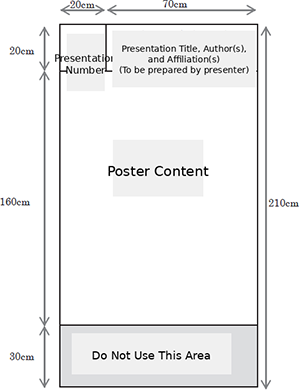
- Please give your presentation in front of your poster under the direction of the session chair.
- For General Poster Presentations, the allotted time is 3 minutes for presentation and 2 minutes for questions and discussion.
Slide Template
Use of this template is optional; please feel free to use it if you wish.
Regarding Conflict of Interest (COI)
Disclosure of COI is mandatory for the lead presenter and all co-presenters. This applies to COI involving the presenters themselves—such as the receipt of salaries, research funding, or personnel from commercial enterprises or organizations related to products or services featured in the research (e.g., through concurrent employment). Please disclose the COI status of the lead presenter and all co-presenters for the past three years. For oral presentations, include this disclosure at the beginning of the slide deck (or immediately following the title/introduction slide); for poster presentations, include it at the end of the poster display.


