
Presentation Guidelines
September 18 (Fri.)-19 (Sat.), 2026 | Senri Life Science Center
1Presentation Times
| Session type | Presentation | Discussion |
|---|---|---|
| President's Lecture, Symposia, and Video Symposia |
As individually communicated | As individually communicated |
| Oral Presentation | 6 minutes | 2 minutes |
| Poster Presentation | Friday, September 18, 17:30-18:00 | Remain by your poster during the assigned session |
2Before Your Session
| Step | Required action |
|---|---|
| 1 | Complete online registration in advance and bring your printed name badge to the venue. |
| 2 | Oral presenters must complete a data/output check at the PC Preview Desk at least 30 minutes before the session begins. |
| 3 | Please arrive at the operator's desk in your presentation room at least 15 minutes before the session begins. |
3 PC Preview Desk
| Date | Opening hours | Location |
|---|---|---|
| Friday, September 18 | 8:00-17:30 | 5F Foyer |
| Saturday, September 19 | 8:00-17:00 | 5F Foyer |
4Presentation Rooms
| Room | Venue | Floor |
|---|---|---|
| Room A | Life Hall | 5F |
| Room B | Science Hall | 5F |
| Poster Area | Foyer | 5F |
5For Chairpersons
- Please be seated at the designated chairperson's seat at least 15 minutes before the session begins.
- Please ensure that all presentations and discussions finish within the scheduled session time.
- Chairpersons do not need to check in at the PC Preview Desk.
6 For Discussants
- Please be seated in the designated next-speaker's seat at least 15 minutes before the session begins.
- If you will use slides, please submit and check your presentation data at the PC Preview Desk at least 30 minutes before the session begins.
- Please speak when invited by the chairperson.
7 Conflict of Interest (COI) Disclosure
All presenters are required to disclose any Conflict of Interest (COI) on their presentation slides or posters.
Oral Presentations
Please prepare and check your presentation data before arriving at the venue.
1Presentation Data Specifications
| Item | Specification |
|---|---|
| Operating system | Windows 11 |
| Application | Microsoft PowerPoint 2021 / 2024 or Microsoft 365 |
| Display | Full HD (1920 x 1080), 16:9 widescreen recommended |
| Recommended fonts | Arial, Calibri, Times New Roman, MS Gothic or MS Mincho (standard fonts only) |
| Video | MP4 format with H.264 video and AAC audio is recommended |
| File name | Abstract number_Presenter's name (example: 21028_Hong) |
2Data Submission
- Bring your presentation data on a USB flash drive.
- Save linked videos, images, graphs and other files in the same folder as the PowerPoint file.
- Check for font substitution, garbled text, image layout and video playback on another Windows computer in advance.
- Special fonts, missing linked files, or unsupported formats/codecs may cause garbled text or playback failures.
- Data editing is not available at the PC Preview Desk. Only minor corrections may be accommodated if operationally possible.
- The Secretariat will delete all presentation data after the conference.
3If You Bring Your Own Computer
- Please bring your own computer if you use a Mac, Keynote, or non-standard video/audio settings.
- HDMI is the standard video connection. If your computer does not have an HDMI port, bring the appropriate adapter.
- Bring your AC power adapter and a backup copy of the presentation on a USB flash drive.
- Disable Wi-Fi, screen savers, sleep mode, automatic updates, notifications and other settings that may interrupt the presentation.
- After the output check, bring your computer to the operator's desk at least 15 minutes before the session begins.
4During Your Presentation
| Signal | Meaning |
|---|---|
| Yellow indicator | 1 minute remaining |
| Red indicator | Presentation time has ended |
- Presentations are operated from the podium using the provided keyboard and mouse.
- Personal presenter tools cannot be connected to the presentation system.
- Please keep strictly to the assigned presentation time.
Poster Presentations
Poster presentations will be held on Friday, September 18, 2026.
1Poster Schedule
| Activity | Date and time | Location |
|---|---|---|
| Poster set-up | Friday, September 18, 10:00-12:00 | 5F Foyer |
| Poster session | Friday, September 18, 17:30-18:00 | 5F Foyer |
| Poster removal | Saturday, September 19, 13:40-16:20 | 5F Foyer |
Important: Please remain at your poster throughout the designated poster session. There will be no chair-led oral presentations. During the session, please respond to questions and engage in discussion with participants.
2Poster Panel Specifications
| Item | Specification |
|---|---|
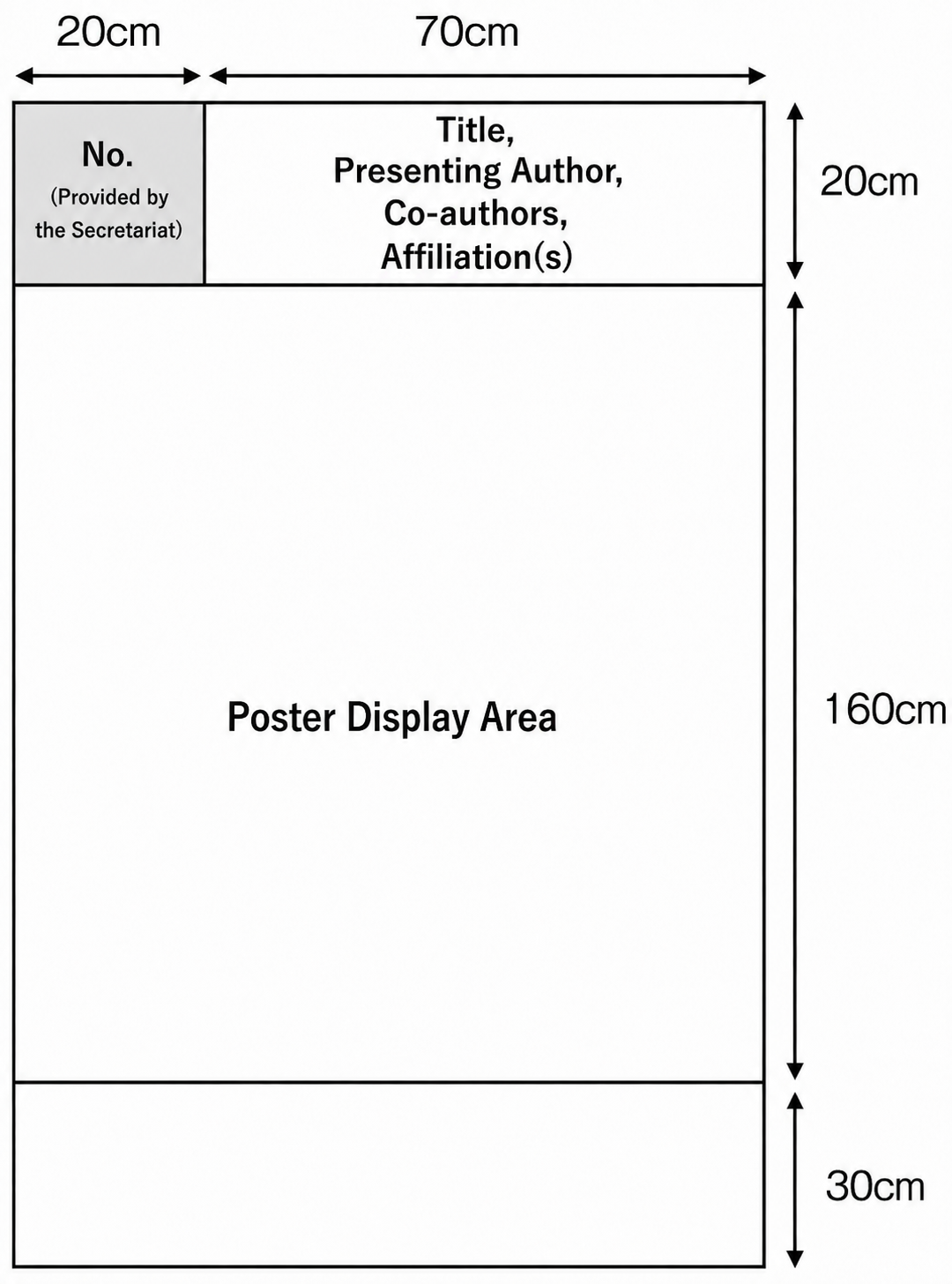
| Panel size | 210cm high x 90cm wide |
| Presentation number | Prepared and attached by the Secretariat |
| Title area | Prepare the title, affiliation and presenter's name within 70cm wide x 20cm high |
| Mounting materials | Pushpins will be provided. Do not use glue or adhesive tape |
3Removal of Posters
Please remove your poster during the designated removal period. Posters remaining after 16:20 on Saturday, September 19 will be disposed of by the Secretariat.
4Inquiries
KJJC2026 Secretariat | kjjc2026@convention.co.jp