
Registration
Important
- Registration and payment are available online only.
- On-site registration and payment will not be available.
- Please complete your registration and payment before arriving at the venue.
Registration Inquiries
E-mail: kjjc2026@reg-convention.com
Registration Period
| Early Bird Registration | July 15 (Wed) - August 31 (Mon), 2026 |
|---|---|
| Regular Registration | September 1 (Tue) - September 19 (Sat), 2026 |
Registration Fee (Tax-exempt)
| Category | Early Bird | Regular |
|---|---|---|
| Doctor | JPY 40,000 | JPY 45,000 |
| Medical Staff | JPY 10,000 | JPY 15,000 |
| Student / Junior Resident * | JPY 10,000 | JPY 15,000 |
| Accompanying Person | JPY 10,000 | JPY 15,000 |
Please review the registration information on this page before proceeding.
Recommended browsers: Please use the latest version of Google Chrome on Windows or Android, or Safari on macOS or iOS.
Online Registration Instructions
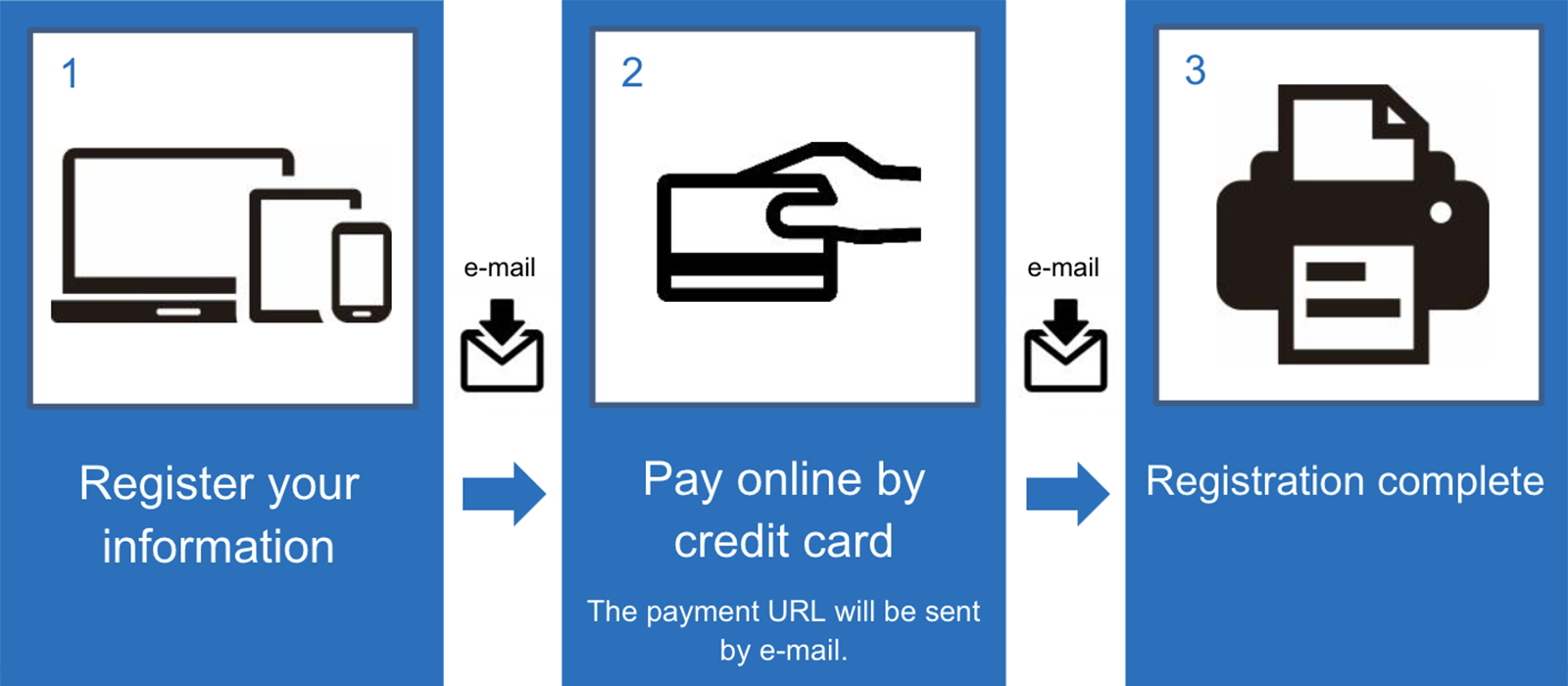
Your registration will not be completed until payment has been confirmed.
3D Secure 2.0
To make online credit card payments more secure, 3D Secure 2.0 authentication is required.
Before registering, please make sure that your card is registered for 3D Secure 2.0.
Authentication methods vary by card issuer and may include a password, one-time password, or biometric authentication. Please follow the instructions shown on the authentication screen.
For details about whether your card supports 3D Secure 2.0, please contact your card issuer directly.
Payment Method
Payment must be made by credit card.

VISA, Mastercard, JCB, American Express, and Diners Club cards are accepted.
Registration and payment are processed by Japan Convention Services, Inc. (JCS).
The merchant name shown on your credit card statement may appear as either "JCS 1" or "日本コンベンションサービス登録1".
Payment Deadline
Payment must be completed within 72 hours after submitting your registration information or by the registration deadline, whichever comes first.
If payment is not completed by the deadline, your registration will become invalid. You will not be able to register again using the same e-mail address. Please use a different e-mail address or contact the Registration Support Desk for assistance.
If you register during the conference, please complete payment before arriving at the venue.
ID and Password
ID: Your registered e-mail address
Password: The password you set during registration
Your ID and password are required to log in to the Service Counter. For security reasons, your password will not be included in e-mails from the conference. Please keep a record of it.
Receiving System E-mails
Before registering, please make sure that your e-mail settings allow messages from the domain event-ope-service.com and messages containing URLs.
System e-mails will be sent from no-reply@event-ope-service.com. If you do not receive an e-mail, please check your junk or spam folder.
Changing Your Registration Information
You can review and update your registration information through the Service Counter.
Your e-mail address and registration category cannot be changed online. If you selected the wrong registration category, please contact the Registration Support Desk by e-mail.
Cancellation Policy
Registration fees are non-refundable after payment has been completed. Refunds cannot be issued for duplicate registrations.
Changes that result in a difference in the registration fee cannot be accepted after payment.
Receipt, Name Tag, and Certificate of Attendance
| Document | How to Receive / Issuing Period | |
|---|---|---|
| Receipt | Available for download from the Service Counter after payment has been completed. Download period: Until October 19 (Mon), 2026 |
|
| Name Tag and Certificate of Attendance | Available together for download from the Service Counter. Please print your name tag and bring it with you to the venue. Download period: September 1 (Tue), 2026 at 12:00 noon - September 28 (Mon), 2026 |
|
FAQ
Click a question to view the answer.
- Can several participants from the same institution register together?
- No. Each participant must register individually.
- I forgot my password.
- Reset your password from the Service Counter using your registered e-mail address.
- I forgot the e-mail address I used to register.
- Please contact the Registration Support Desk.
- How can I correct my name, institution, or other registration information?
- Log in to the Service Counter and update your information.
Your e-mail address and registration category cannot be changed online. Please contact the Registration Support Desk if either needs to be corrected. - My credit card payment could not be completed.
- Check your card information and security code. If the error continues, please contact your card issuer.
- The payment URL does not open the payment page.
- Copy the entire URL, beginning with "https://", and paste it into your browser.
- I have not received an e-mail from the registration system.
- Check your junk or spam folder for an e-mail from no-reply@event-ope-service.com. Also make sure that your settings allow messages from event-ope-service.com and messages containing URLs. If you still cannot find the e-mail, please contact the Registration Support Desk.
Handling of Personal Information
Personal information submitted during registration will be handled in accordance with the KJJC2026 Privacy Policy.
Non-personally identifiable statistical data, such as registration category, gender, age group, and area of expertise, may be used to analyze registration trends.
Inquiries
For Registration
KJJC2026 Registration Support Desk
E-mail: kjjc2026@reg-convention.com
Office hours: 10:00-17:00, weekdays only (JST/KST)
Please include your name and institution/company in your inquiry.
For KJJC2026 Conference
KJJC2026 Secretariat
c/o Japan Convention Services, Inc.
E-mail: kjjc2026@convention.co.jp