
For Chairpersons
Chairpersons are kindly requested to be seated in the next chairperson’s seat at the front of the session room 10 minutes prior to the scheduled start of the session.
Please confirm the attendance of speakers 1 minute before the session begins, and start the session promptly at the scheduled time.
To ensure the smooth progress of the program, we kindly ask for your cooperation in strictly adhering to the schedule.
Oral Presentation Guidelines
Presentation Time
(Symposium, Oral Presentation, Clinicopathological Conference, and Poster Presentation)
| Session | Presentation | Q&A |
|---|---|---|
| Symposium | 12 min | 3 min |
| Oral Presentation | 8 min | 2 min |
| Poster Presentation | 6 min | 2 min |
| Clinicopathological Conference | Presenter: 8 min / Discussant: 8 min | |
For other invited presentations, please follow the presentation time individually assigned to you.
Please strictly observe the allotted presentation time.
Presentation Equipment
Each session room will be equipped with one screen and one PC projector.
PC Preview Desk
The PC Preview Desk will be located in the Lobby (1F).
June 11: 8:00–18:30
June 12: 8:00–17:00
June 13: 8:00–17:30
June 14: 8:00–11:00
All speakers are requested to complete check-in and confirm the operation of their presentation data at the PC Preview Desk at least 30 minutes prior to their presentation.
Speakers presenting on the morning of June 12, 13, or 14 are kindly requested, whenever possible, to complete the check-in and data confirmation on the previous day or earlier.
Instructions for Speakers Bringing Presentation Data (USB/CD-R)
Please bring your presentation data on a USB flash drive.
The PCs available at the PC Preview Desk are equipped with Microsoft PowerPoint 365 on Windows 11.
Speakers using Mac computers are requested to bring their own laptop computer.
Please use standard OS fonts (e.g., MS Gothic, MS Mincho, Times New Roman, Century).
If your presentation includes video files, MP4 or WMV format is recommended.
If your presentation contains linked files (images, videos, graphs, etc.), please ensure that all linked data are saved together in the same folder. We strongly recommend testing your presentation in advance on a different computer.
Please ensure your files have been checked using updated antivirus software.
All presentation data submitted to the Secretariat will be securely deleted after the meeting.
Instructions for Speakers Bringing Their Own Laptop Computer
The projector connection terminal is HDMI. HDMI adapters are available at the PC Preview Desk.
If an adapter is required for your device, please make sure to bring your own connector.
Please also bring your power adapter.
To facilitate smooth session management, speakers are kindly requested not to use Presenter View in PowerPoint.
Presentation Operation
A laptop computer will not be placed on the podium.
Speakers should monitor their presentation using the display on the podium and operate the mouse themselves during the presentation.
Please note that no additional time will be granted in the event of technical trouble.
Speakers are requested to complete their presentation within the allotted time.
Application for Poster Printing Service
It is an option service for poster presenters.
For more details, please refer to the email sent to the poster presenters in mid-May.
Application deadline: 5 PM, June 1 (Mon), 2026, JST.
Poster Presentation Guidelines
Poster Display Space
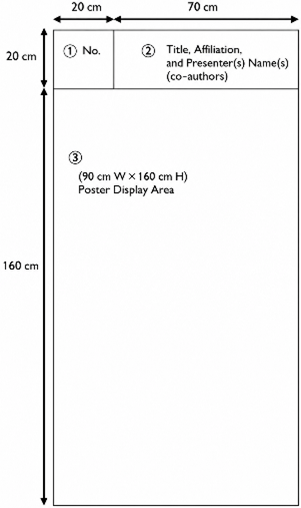
The poster panel size is 90 cm (W) × 180 cm (H), including the title and abstract number.
Presenters are requested to prepare the following materials themselves:
- Title, affiliation(s), and presenter name(s)
(Upper right area: 70 cm (W) × 20 cm (H)) - Poster content
(90 cm (W) × 160 cm (H))
The presentation number (upper left area: 20 cm × 20 cm) and push pins will be provided by the Secretariat.
Poster Mounting
All posters, regardless of presentation date, should be mounted in the designated location during the following time period:
June 12: 12:00 – 13:00
June 13: 9:00 – 10:00
June 14: 8:00 – 8:30
Poster Removal
Posters should be removed during the following period:
June 12: 16:20 – 17:00
June 13: 17:10 – 18:00
June 14: 11:20 – 12:00
Please note that posters not removed within the designated time will be removed and discarded by the Secretariat.
Conflict of Interest (COI) Disclosure
All presenters are required to disclose any Conflict of Interest (COI) on their presentation slides or posters.